Margin Reports
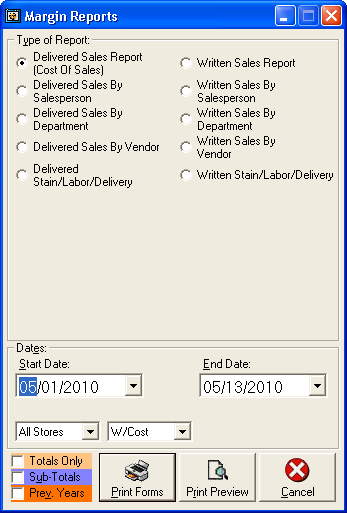 To print or view Margin Reports, click Inventory: Reports: Margin Reports.
There are 10 Margin Reports to choose from:
To print or view Margin Reports, click Inventory: Reports: Margin Reports.
There are 10 Margin Reports to choose from:
-
Delivered Sales Report (Cost of Sales)
-
Enter the Start Date and End.
This report shows all sales that have been delivered.
It also shows Total Landed, Total Sell At, and Average G/M.
-
Delivered Sales by Salesperson
-
Enter the Start Date and End.
This report shows sales that have been delivered, by salesperson.
It also shows Total Landed, Total Sell At, and Average G/M for each salesperson.
-
Delivered Sales by Department
-
Enter the Start Date and End.
This report shows sales that have been delivered, by department.
It also shows Total Landed, Total Sell At, and Average G/M for each department.
-
Delivered Sales by Vendor
-
Enter the Start Date and End.
This report shows sales that have been delivered, by vendor.
It also shows Total Sell At and Average G/M for each vendor.
-
Delivered Stain/Labor/Delivery
-
Shows the amount of Stain, Labor, or Delivery charges are delivered.
-
Written Sales Report
-
Enter the Start Date and End.
This report shows all sales.
It also shows Total Landed, Total Sell At, and Average G/M.
-
Written Sales by Salesperson
-
Enter the Start Date and End .
This report shows sales that have been written, by salesperson.
It also shows Total Landed, Total Sell At, and Average G/M for each salesperson.
-
Written Sales by Department
-
Enter the Start Date and End.
This report shows sales that have been written, by department.
It also shows Total Landed, Total Sell At, and Average G/M for each department.
-
Written Sales by Vendor
-
Enter the Start Date and End.
This report shows sales that have been written, by vendor.
It also shows Total Sell At and Average G/M for each vendor.
-
Written Stain/Labor/Delivery
-
Shows the amount of Stain, Labor, or Delivery charges are in written sales.
Choose either Print or Print Preview.
Print (default) will print the report on the default printer, Print Preview will show the report on screen.
For help with the Print Preview function, see the Print Preview help page.